Build an AI Knowledge Base in 20 Minutes? Complete RAG Tutorial with Workers AI + Vectorize (Full Code Included)
Introduction
Wanted to build an intelligent customer service for your company, looked up RAG tutorials online, but they either gave vague theoretical explanations or asked you to rent GPUs and set up environments first - pretty overwhelming. To be honest, when I first started researching this, I faced the same issues. Just configuring LangChain and the vector database took me two days, and it still wasn’t running.
Later, I discovered that Cloudflare released a complete suite of AI tools: Workers AI + Vectorize + D1, all fully managed with generous free tiers. I tried building a note Q&A application with them, and it genuinely took less than 20 minutes from zero to functional, with just about a hundred lines of code.
This article will walk you through the complete process step by step:
- First, explain clearly what RAG actually is (in plain language, no jargon)
- Build a working knowledge base Q&A application (with complete code)
- Optimization tips to make retrieval more accurate and costs lower
- Deploy and launch to actually use it
All you need is some JavaScript knowledge and a Cloudflare account (free), and you can follow along to build this.
What is RAG? Understanding the Workflow in 5 Minutes
Understanding RAG Through Exams
Let me start with an intuitive analogy. When you take an exam, closed-book exams rely solely on what you’ve memorized - if you forget something, you make stuff up. Open-book exams are different - when unsure, you can look things up, making your answers much more accurate.
RAG (Retrieval-Augmented Generation) is giving AI the open-book exam privilege.
Traditional LLMs are like closed-book exams, only answering based on data seen during training. The problems are:
- Training data has a cutoff date, doesn’t know recent developments
- Hasn’t seen your company’s internal documents
- Can’t remember all details, tends to hallucinate (technical term)
RAG’s approach is: first find relevant materials from your prepared knowledge base, then give those materials to the AI, letting it answer based on this content. This way, answers are both reliable and incorporate latest information.
Three Core Steps of RAG
The entire process is really just three steps:
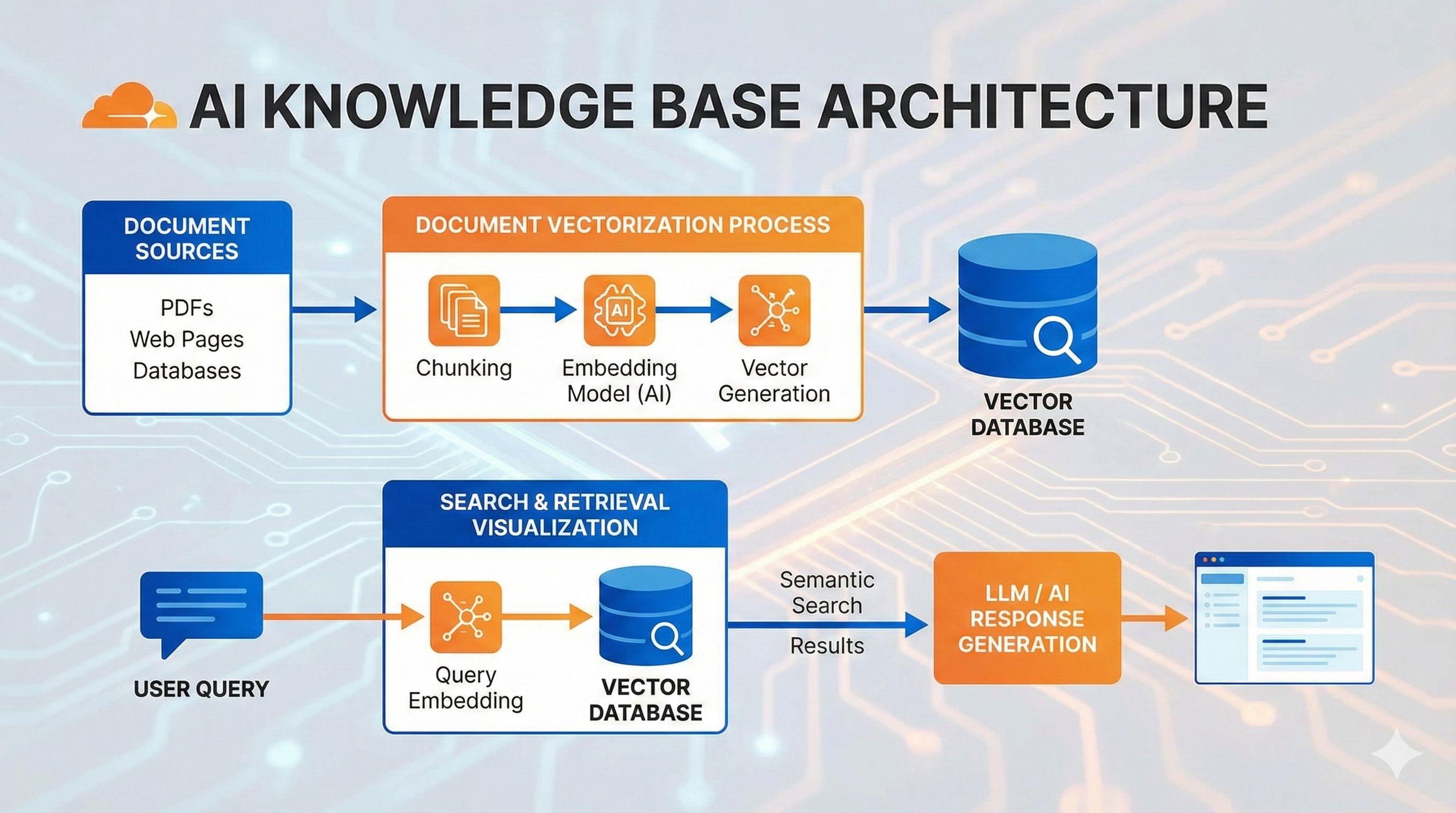
Step 1: Convert knowledge into vectors and store them
You have a bunch of documents, right? RAG converts each text segment into a series of numbers (technically called “vectors” or “embeddings”), which represent the text’s semantic meaning.
For example, “cats are cute” and “kittens are adorable” use different words but have similar meanings, so when converted to vectors, these number sequences will also be very close. These vectors are stored in a vector database like Vectorize.
Step 2: When users ask questions, find the most relevant knowledge fragments
When a user asks “how to train a cat,” the system first converts this question into a vector too, then finds the “closest” segments in the database - meaning the semantically most relevant knowledge.
This process is called “similarity search,” very fast - finding the top 3-5 matches from tens of thousands of entries in just milliseconds.
Step 3: Feed the retrieved content to the LLM to generate answers
After finding relevant content, assemble it into a prompt and send to the AI:
Here are relevant materials:
[Retrieved content 1]
[Retrieved content 2]
...

User question: How to train a cat?

Please answer based on the above materials.
The AI, seeing these “reference materials,” can provide accurate and well-grounded answers.
Why Choose the Cloudflare Stack?
There are many RAG solutions out there - LangChain, LlamaIndex, etc. all work, but they require configuring environments, choosing vector databases, managing GPU resources - quite tedious.
The advantages of Cloudflare’s solution are:
Workers AI - Built-in dozen open-source models (Llama 3, Claude, etc.), just call the API, no need to rent GPUs. The free tier has a daily Neurons quota (metering unit), sufficient for personal projects.
Vectorize - Managed vector database, no need to set up Milvus, Pinecone, etc. yourself. Creating indexes, inserting vectors, similarity search - all done in a few lines of code.
D1 - Cloudflare’s SQLite database for storing original text. The vector database only stores vectors, the actual text content still needs to be retrieved from here.
Fully managed - This is the best part. No worrying about servers, scaling, backups - just focus on writing code. Plus, Cloudflare’s edge network means fast global access.
In 2025, Cloudflare also launched AutoRAG, further simplifying the process - upload documents to R2, and chunking, vectorization, retrieval, and generation are all automatic. But in this article, we’ll still build it manually to learn the underlying principles.
Enough theory, let’s build one.
Hands-On Practice - Building Your First RAG Application
We’ll make a note Q&A application: users can add notes, then ask questions, and the system finds relevant content from all notes to answer.
Project Initialization and Environment Setup
First install Wrangler (Cloudflare’s CLI tool):
npm install -g wrangler
wrangler login  # Log into your Cloudflare account
Create the project:
npm create cloudflare@latest rag-notes-app
# Choose "Hello World" worker
# Choose TypeScript
cd rag-notes-app
Install the Hono routing library (better than native Workers API):
npm install honoCreate D1 database and Vectorize index:
# Create D1 database to store original notes
wrangler d1 create notes-db

# Create Vectorize index (768 dimensions, matching bge-base-en-v1.5 model)
wrangler vectorize create notes-index --dimensions=768 --metric=cosine
Then configure wrangler.jsonc (or wrangler.toml):
{
  "name": "rag-notes-app",
  "main": "src/index.ts",
  "compatibility_date": "2024-01-01",
  "node_compat": true,

  // AI binding
  "ai": {
    "binding": "AI"
  },

  // D1 database binding
  "d1_databases": [
    {
      "binding": "DB",
      "database_name": "notes-db",
      "database_id": "your-database-id"  // Copy from the create command output
    }
  ],

  // Vectorize index binding
  "vectorize": [
    {
      "binding": "VECTORIZE",
      "index_name": "notes-index"
    }
  ],

  // Workflow binding (handling async vectorization tasks)
  "workflows": [
    {
      "binding": "RAG_WORKFLOW",
      "name": "rag-workflow",
      "class_name": "RAGWorkflow"
    }
  ]
}
Initialize database tables:
-- schema.sql
CREATE TABLE IF NOT EXISTS notes (
  id INTEGER PRIMARY KEY AUTOINCREMENT,
  text TEXT NOT NULL,
  created_at DATETIME DEFAULT CURRENT_TIMESTAMP
);
Run:
wrangler d1 execute notes-db --file=./schema.sqlImplementing Knowledge Base Entry Functionality
This is the core of the entire RAG system - converting user notes into vectors and storing them.
Create src/workflow.ts (Workflow handles async tasks):
import { WorkflowEntrypoint, WorkflowStep } from 'cloudflare:workers';

type Env = {
  AI: Ai;
  DB: D1Database;
  VECTORIZE: VectorizeIndex;
};

type Params = {
  noteId: number;
  text: string;
};

export class RAGWorkflow extends WorkflowEntrypoint<Env, Params> {
  async run(event: WorkflowEvent<Params>, step: WorkflowStep) {
    const { noteId, text } = event.payload;

    // Step 1: Confirm D1 record created (completed by main route)

    // Step 2: Generate vectors
    const embeddings = await step.do('generate embeddings', async () => {
      const response = await this.env.AI.run(
        '@cf/baai/bge-base-en-v1.5',  // 768-dim Embedding model
        { text: [text] }
      );
      return response.data[0];  // Return vector array
    });

    // Step 3: Insert into Vectorize
    await step.do('insert vector', async () => {
      await this.env.VECTORIZE.insert([
        {
          id: noteId.toString(),
          values: embeddings,
          metadata: { text }  // Store text copy for debugging
        }
      ]);
    });
  }
}
Main route src/index.ts (handling note addition):
import { Hono } from 'hono';
import { RAGWorkflow } from './workflow';

type Bindings = {
  AI: Ai;
  DB: D1Database;
  VECTORIZE: VectorizeIndex;
  RAG_WORKFLOW: Workflow;
};

const app = new Hono<{ Bindings: Bindings }>();

// Add note
app.post('/notes', async (c) => {
  const { text } = await c.req.json<{ text: string }>();

  if (!text?.trim()) {
    return c.json({ error: 'Text is required' }, 400);
  }

  // Insert into D1
  const result = await c.env.DB.prepare(
    'INSERT INTO notes (text) VALUES (?) RETURNING id'
  ).bind(text).first<{ id: number }>();

  if (!result) {
    return c.json({ error: 'Failed to create note' }, 500);
  }

  // Trigger Workflow to async generate vectors
  await c.env.RAG_WORKFLOW.create({
    params: { noteId: result.id, text }
  });

  return c.json({
    id: result.id,
    message: 'Note created, vectorization in progress'
  });
});

export default app;
export { RAGWorkflow };
This way, when users send POST requests to add notes:
- Text is immediately saved to D1
- Background Workflow slowly generates vectors and inserts into Vectorize
- Even if vectorization takes a few seconds, it doesn’t block user requests
Implementing Intelligent Q&A Functionality
Now we can store notes, let’s implement querying.
Add to src/index.ts:
// Query Q&A
app.get('/', async (c) => {
  const query = c.req.query('q');

  if (!query) {
    return c.json({ error: 'Query parameter "q" is required' }, 400);
  }

  // Step 1: Convert question to vector
  const queryEmbedding = await c.env.AI.run(
    '@cf/baai/bge-base-en-v1.5',
    { text: [query] }
  );

  // Step 2: Find top 3 most similar notes in Vectorize
  const matches = await c.env.VECTORIZE.query(
    queryEmbedding.data[0],
    { topK: 3, returnMetadata: true }
  );

  if (matches.count === 0) {
    return c.json({ answer: 'No relevant notes found' });
  }

  // Step 3: Get full text from D1 (if needed)
  const noteIds = matches.matches.map(m => m.id);
  const notes = await c.env.DB.prepare(
    `SELECT text FROM notes WHERE id IN (${noteIds.map(() => '?').join(',')})`
  ).bind(...noteIds).all();

  // Step 4: Construct prompt, call LLM to generate answer
  const context = notes.results.map((n: any) => n.text).join('\n\n---\n\n');

  const prompt = `Here are relevant note contents:

${context}

User question: ${query}

Please answer the user's question based on the above note contents. If the notes don't contain relevant information, please state that.`;

  const aiResponse = await c.env.AI.run(
    '@cf/meta/llama-3-8b-instruct',  // Or use claude-3-5-sonnet-latest
    {
      messages: [
        { role: 'system', content: 'You are an intelligent notes assistant' },
        { role: 'user', content: prompt }
      ]
    }
  );

  return c.json({
    answer: aiResponse.response,
    sources: matches.matches.map(m => ({
      id: m.id,
      score: m.score,
      text: m.metadata?.text
    }))
  });
});
Test it:
# Run locally
wrangler dev

# Add notes
curl -X POST http://localhost:8787/notes \
  -H "Content-Type: application/json" \
  -d '{"text": "Cloudflare Workers AI supports Llama 3 and Claude models"}'

curl -X POST http://localhost:8787/notes \
  -H "Content-Type: application/json" \
  -d '{"text": "Vectorize uses cosine similarity for vector retrieval"}'

# Wait a few seconds for Workflow to complete vectorization

# Ask question
curl "http://localhost:8787/?q=What%20models%20does%20Workers%20AI%20have"
If everything works, you’ll receive an answer based on the note contents.
Delete and Update Functionality
When deleting notes, remember to delete from both D1 and Vectorize:
app.delete('/notes/:id', async (c) => {
  const id = c.req.param('id');

  // Delete from D1
  await c.env.DB.prepare('DELETE FROM notes WHERE id = ?').bind(id).run();

  // Delete from Vectorize
  await c.env.VECTORIZE.deleteByIds([id]);

  return c.json({ message: 'Note deleted' });
});
For updates, the simplest approach is delete-then-add (regenerating vectors).
Complete code available in the Cloudflare official example.
Advanced Optimization - Making Your RAG Smarter
Basic functionality is running, but to really use it in production projects, there are some details worth optimizing.
Text Chunking Strategy
Currently we’re storing entire notes as one unit. If notes are long (like a technical document), this causes problems:
- During retrieval, the entire document’s similarity might not be high (only partial paragraphs are relevant)
- Prompts that are too long exceed the LLM’s context window limit
A better approach is splitting long texts into chunks, generating vectors for each chunk separately.
Simple chunking method:
function splitText(text: string, chunkSize: number = 500, overlap: number = 50): string[] {
  const chunks: string[] = [];
  let start = 0;

  while (start < text.length) {
    const end = Math.min(start + chunkSize, text.length);
    chunks.push(text.slice(start, end));
    start = end - overlap;  // Slight overlap to avoid cutting sentences
  }

  return chunks;
}
A smarter approach is splitting by paragraphs or semantic meaning (can use LangChain’s RecursiveCharacterTextSplitter), though for most scenarios, fixed-length + overlap is sufficient.
Modify the Workflow to assign unique IDs to each chunk:
const chunks = splitText(text);

for (let i = 0; i < chunks.length; i++) {
  const chunkId = `${noteId}-${i}`;
  const embeddings = await this.env.AI.run('@cf/baai/bge-base-en-v1.5', {
    text: [chunks[i]]
  });

  await this.env.VECTORIZE.insert([{
    id: chunkId,
    values: embeddings.data[0],
    metadata: { noteId, chunkIndex: i, text: chunks[i] }
  }]);
}
Improving Retrieval Accuracy
Adjusting topK and similarity threshold
Default top 3 might not be enough, or too many. Try adjusting to 5 while filtering out low-similarity results:
const matches = await c.env.VECTORIZE.query(queryEmbedding.data[0], {
  topK: 5,
  returnMetadata: true
});

// Only keep results with similarity > 0.7
const relevantMatches = matches.matches.filter(m => m.score > 0.7);
Similarity scores range from 0-1 (cosine similarity), above 0.7 generally indicates high relevance.
Optimizing Prompts
Don’t just throw retrieved content at the AI, tell it how to use this information:
const prompt = `You are an intelligent notes assistant. Here are relevant contents retrieved from the notes library (sorted by relevance):

${context}

Please answer the user's question strictly based on the above content. If the content is insufficient to answer the question, clearly state "no relevant information found in notes," do not fabricate answers.

User question: ${query}`;
Key points:
- Clearly tell the AI these are retrieved materials
- Require it to answer only based on this content
- Allow it to admit “don’t know”
This reduces AI hallucination.
Cost Control and Rate Limiting
Workers AI free tier has daily Neurons quota limits (specific values change, check the Pricing page for latest).
Monitoring usage:
In Cloudflare Dashboard → Workers AI, you can see daily consumption. Different models consume different amounts - Embedding models are cheaper, LLM generation more expensive.
Degradation strategies:
If worried about exceeding quota, you can:
- Limit per-user request frequency (use KV or Durable Objects for counting)
- After exceeding quota, switch to smaller models or return cached results
- For non-critical requests, return retrieved raw text directly without calling LLM
// Simple rate limiting example
const userKey = c.req.header('X-User-ID') || 'anonymous';
const requestCount = await c.env.KV.get(`rate:${userKey}`) || 0;

if (requestCount > 100) {
  return c.json({ error: 'Rate limit exceeded' }, 429);
}

await c.env.KV.put(`rate:${userKey}`, requestCount + 1, { expirationTtl: 86400 });
Switching to More Powerful Models
Llama 3 8B is already pretty good, but if you want better understanding, try Claude:
// Need to bind Anthropic API key in Dashboard first
const aiResponse = await c.env.AI.run('claude-3-5-sonnet-latest', {
  messages: [
    { role: 'system', content: 'You are an intelligent notes assistant' },
    { role: 'user', content: prompt }
  ]
});
Claude’s understanding and output quality are indeed better, but consumes more Neurons. Choose based on actual needs.
My experience:
- Simple Q&A: Llama 3 is sufficient
- Requires reasoning/summarization: Claude noticeably better
- Limited budget: Test with Llama first, upgrade after confirming needs
Deployment and Real-World Application Scenarios
Deployment Process
After local testing is good, deployment is super simple:
wrangler deployJust this one line, Cloudflare will automatically:
- Package your code
- Deploy to global edge nodes
- Generate a
.workers.devdomain
You’ll see output like:
Published rag-notes-app
  https://rag-notes-app.your-account.workers.dev
That’s your API address.
Binding custom domain (optional):
If you have a domain hosted on Cloudflare, you can bind it:
wrangler domains add api.yourdomain.comOr add in Dashboard → Workers & Pages → your Worker → Settings → Domains.
Environment variables and Secrets:
If you used Anthropic API key or other sensitive info:
wrangler secret put ANTHROPIC_API_KEY
# Enter your key
Use in code like:
const apiKey = c.env.ANTHROPIC_API_KEY;Real-World Application Scenarios
This RAG architecture can do quite a lot, here are some real scenarios:
1. Enterprise Knowledge Base Q&A
Scenario: Company has hundreds of pages of employee handbooks, technical docs, FAQs - new employees struggle to find information.
Approach:
- Upload all documents, chunk by sections into Vectorize
- Create simple web interface or integrate with enterprise WeChat bot
- Employees directly ask “what’s the reimbursement process,” system auto-retrieves relevant sections to answer
Benefits: 24/7 availability, much faster than searching through documents.
2. Intelligent Customer Service
Scenario: E-commerce site has tons of product info and after-sales policies, customer service repeatedly answers same questions.
Approach:
- Store FAQs, product descriptions, return policies
- Let RAG system answer user inquiries first
- Transfer to human agents only when can’t answer
Results: One developer using this approach reduced customer service load by 60%+.
3. Personal Notes Assistant
Scenario: You’ve kept notes in Notion or Obsidian for years, want to quickly find specific knowledge.
Approach:
- Periodically export notes, add to RAG system via API
- When needed, directly ask “what was that TypeScript trick I saw”
- System retrieves relevant note fragments
I use a similar tool myself, information retrieval efficiency really improved a lot.
4. “Chat with PDF” Tool
Scenario: User uploads a PDF (paper, contract, report), wants to quickly extract information.
Approach (referencing Rohit Patil’s case):
- User uploads PDF to R2
- Worker reads PDF, extracts text, chunks and vectorizes
- User can ask “what are the payment terms in this contract”
This scenario is particularly practical, many in legal and consulting industries need it.
Common Issue Troubleshooting
Issue 1: Vector dimension mismatch
Error: dimension mismatch: expected 768, got 512
Cause: Dimensions set when creating Vectorize index (768) don’t match model output dimensions.
Solution: Ensure index dimensions match model. bge-base-en-v1.5 is 768-dim, don’t use wrong model.
Issue 2: D1 and Vectorize data inconsistency
Symptom: Query returns note IDs that don’t exist in D1.
Cause: Might have forgotten to delete from Vectorize when deleting D1 records, or Workflow failed.
Solution: Either wrap delete operations in transactions, or use Workflow to ensure both sides are cleaned.
Issue 3: Workflow timeout
Error: workflow execution timeout
Cause: Vectorizing large amounts of text exceeds Workflow time limits.
Solution: Split large documents into multiple Workflow tasks, or batch process.
// Batch processing
const batchSize = 10;
for (let i = 0; i < chunks.length; i += batchSize) {
  const batch = chunks.slice(i, i + batchSize);
  await c.env.RAG_WORKFLOW.create({
    params: { noteId, chunks: batch, offset: i }
  });
}
Conclusion
Having said all this, let’s recap what we’ve done:
- Understood RAG principles: Retrieval-Augmented Generation is giving AI open-book exam privileges, finding materials first then answering
- Built a working application: Notes Q&A system, from environment setup to code implementation, complete walkthrough
- Learned optimization techniques: Text chunking, retrieval tuning, cost control - these details make applications truly usable
- Saw real scenarios: Enterprise knowledge bases, intelligent customer service, personal assistants, PDF chat - all implementable directions
Cloudflare stack’s biggest advantage is low barrier to entry. No need to rent GPUs, set up databases, worry about operations - free tier is absolutely sufficient for personal projects. Even for production environments, paid plans are cheaper than self-hosting.
Next, you can:
- Get hands-on immediately: Clone the official example code, run
wrangler dev, see results in 5 minutes - Connect real data: Import your notes, docs, FAQs, see how retrieval quality is
- Build a frontend: Create simple chat interface with React/Vue, or deploy directly with Cloudflare Pages
- Explore more possibilities: Try multimodal RAG (combining images, tables), GraphRAG (knowledge graph enhancement), etc.
RAG is one of the most practical architectures for current AI applications. Mastering it lets you build many interesting things. Having tried it, the Cloudflare stack indeed solves quite a few real problems.
If you run into issues, check out Cloudflare Discord or Community forum - the community is quite active.
Published on: Dec 1, 2025 · Modified on: Dec 4, 2025

Related Posts
Tired of Switching AI Providers? One AI Gateway for Monitoring, Caching & Failover (Cut Costs by 40%)
OpenAI Blocked in China? Set Up Workers Proxy for Free in 5 Minutes (Complete Code Included)